Section: Actuator
This section controls the actuator type models. This includes the actuator
disk and line models. The prefix is the label set in
incflo.physics. For example
incflo.physics = FreeStream Actuator
Actuator models are meant to simulate aerodynamic objects by using body forces
in the momentum equation.
There are capabilities to simulate fixed wings as actuator lines and wind
turbines as actuator disks and actuator line models.
- Actuator.labels
type: String, mandatory
This string is used as an identifier for the current actuator.
- Actuator.type
type: String, mandatory
This string identifies the type of actuator to use. The ones currently supported are:
UniformCtDisk,JoukowskyDisk,TurbineFastLine,TurbineFastDisk,TurbineKynemaFMBLine,TurbineKynemaFMBDisk,FixedWingLine,ActuatorSector, andDrone.The Kynema-FMB coupled actuator turbine types are documented in the dedicated reference page Actuator-Based Kynema-FMB Coupling.
It is recommended to group common parameters across actuators using the Actuator.[type].[param]. For example:
Actuator.Turb1.type            = UniformCtDisk"
Actuator.Turb1.epsilon         = 5.0 5.0 5.0"
Actuator.Turb2.type            = UniformCtDisk"
Actuator.Turb2.epsilon         = 5.0 5.0 5.0"
becomes:
Actuator.UniformCtDisk.epsilon = 5.0 5.0 5.0"
Actuator.Turb1.type            = UniformCtDisk"
Actuator.Turb2.type            = UniformCtDisk"
FixedWingLine
Example for FixedWingLine:
incflo.physics = FreeStream Actuator
Actuator.labels = F1
Actuator.type = FixedWingLine
Actuator.FixedWingLine.num_points = 21
Actuator.FixedWingLine.epsilon = 3.0 3.0 3.0
Actuator.FixedWingLine.epsilon_chord = 0.25 0.25 0.25
Actuator.FixedWingLine.fllc = 0
Actuator.FixedWingLine.pitch = 4.0
Actuator.FixedWingLine.span_locs = 0.0 1.0
Actuator.FixedWingLine.chord = 2.0 2.0
Actuator.FixedWingLine.airfoil_table = DU21_A17.txt
Actuator.FixedWingLine.airfoil_type = openfast
Actuator.F1.start = 0.0 -4.0 0.0
Actuator.F1.end = 0.0 4.0 0.0
Actuator.F1.output_frequency = 10
ICNS.source_terms = ActuatorForcing
- Actuator.FixedWingLine.num_points
type: int, mandatory
This is the number of actuator points along the wing to be used in the simulation.
- Actuator.FixedWingLine.epsilon
type: List of 3 real numbers, mandatory
This is the value of epsilon in the chord, thickness and spanwise directions.
- Actuator.FixedWingLine.epsilon_chord
type: List of 3 real numbers, optional
This is the value of epsilon/chord. This value will be used to compute epsilon as a function of the chord at every actuator point. A value of epsilon / chord ~ 0.25 is recommended for an optimal representation of the blade aerodynamics. When this variable is specified, the code will choose the maximum value between
epsilon_chord * chordandepsilonfor every actuator point.
- Actuator.FixedWingLine.fllc
type: Bool, optional
This option will activate the filtered lifting line correction (fllc). The correction follows the implementation of Martinez-Tossas and Meneveau (2019) and Blaylock et al (2022). The use of the fllc requires
epsilonand an optimalepsilon_chordas an input. The recommended value is 0.25 in all directions forepsilon_chordand a value ofepsilonin all directions that would be greater than at least 2.5 times the grid sizedx. The default is 0.
- Actuator.FixedWingLine.fllc_type
type: String, optional, default =
variable_chordThis option tells whether to use the original fllc formulation outlined in Martinez-Tossas and Meneveau (2019), which assumes a constant chord length across blade (specified as
constant_chord), or to use a new formulation outlined in Martinez-Tossas et al. (2023), which accounts for chord variations (specified asvariable_chord).
- Actuator.FixedWingLine.fllc_relaxation_factor
type: Double, optional
The relaxation factor to be applied to the updated velocity see: Martinez-Tossas and Meneveau (2019) The default value is 0.1.
- Actuator.FixedWingLine.fllc_start_time
type: Double, optional
The time in the simulation from when to start using the correction. The default value is 0.
- Actuator.FixedWingLine.fllc_nonuniform
type: Bool
The flag to specify if the actuator points used to compute the correction should be non-uniformly distributed. This helps in using less points for the fllc while still maintaining the accuracy of the fllc. The default value is true.
- Actuator.FixedWingLine.fllc_epsilon_dr_ratio
type: Double, optional
The ratio of epsilon to actuator point spacing used to create a non-uniform distribution. A value of 1 or greater is recommended. The default value is 1.
- Actuator.FixedWingLine.pitch
type: Real number, mandatory
This is the pitch angle of the blade in degrees. All coordinates will be pitched by this angle. In the case of a fixed wing, this would be the angle of attack of the wing with respect to the inflow velocity. This argument is mandatory unless a pitch timetable is specified.
- Actuator.FixedWingLine.span_locs
type: List of real numbers, mandatory
These are non-dimensional span locations from 0 to 1. These locations are used to specify the chord values at every span location of the blade.
- Actuator.FixedWingLine.chord
type: List of real numbers, mandatory
These are the chord values at every span location. The length of this array needs to be the same length as
span_locs.
- Actuator.FixedWingLine.airfoil_table
type: String, mandatory
This is the name of the file that contains the lookup table for lift and drag coefficients.
- Actuator.FixedWingLine.airfoil_type
type: String, mandatory
This is the type of airfoil table lookup. The currently supported options are
openfastandtext.
- Actuator.F1.start
type: List of 3 real numbers, mandatory
This is the starting point of the wing where the first actuator point will be.
- Actuator.F1.end
type: List of 3 real numbers, mandatory
This is the end point of the wing where the last actuator point will be.
- Actuator.F1.output_frequency
type: int, optional
This is how often to write actuator output. The default is
10.
- Actuator.FixedWingLine.motion_type
type: String, optional
The FixedWingLine actuator allows for motion, though other aspects of the actuator remain fixed (such as the orientation and the dimensions). The currently supported options are
none(default),linear, andsine. Linear motion moves the actuator at a constant velocity in a straight line whereas sine motion oscillates the actuator according to a temporal sine signal.
- Actuator.FixedWingLine.velocity
type: List of 3 real numbers, mandatory when motion_type =
linearThis vector provides the prescribed constant velocity of the actuator motion.
- Actuator.FixedWingLine.sine_vector
type: List of 3 real numbers, mandatory when motion_type =
sineThis vector provides the actuator displacement from its initial, specified location as it moves according to the oscillatory sine signal. The range of motion of the actuator will be between (initial location + sine vector) and (initial location - sine vector).
- Actuator.FixedWingLine.sine_period
type: Real number, mandatory when motion_type =
linearThis value specifies the temporal period of the sine signal.
- Actuator.FixedWingLine.pitch_timetable
type: String, optional
File name of pitch timetable. This file must specify pitch angles at different times below a one-line header. When this argument is present, the
pitchargument is no longer mandatory, and it will not be used.
- Actuator.FixedWingLine.disable_spanwise_gaussian
type: Boolean, optional, default = false
When this option is turned on, the actuator Gaussian is disabled in the spanwise Gaussian, making the force distribution uniform in that direction. This option enables quasi-2D simulations with a fixed wing. The code will print warning statements if the detected spanwise direction is not periodic.
- Actuator.FixedWingLine.normalize_spanwise
type: Boolean, optional, default = true
When the
disable_spanwise_gaussianis true, the default behavior is to normalize the Gaussian and force quantities in the spanwise direction, preventing the number of actuator points or the actuator point spacing from affecting the results. When this option is false, the ordinary treatment of the Gaussian and force quantities in the spanwise direction is used instead. Setting this option to false can be useful for verification studies.
- Actuator.FixedWingLine.prescribed_uinf
type: Real, optional, default = -1.0
This input allows the freestream velocity sampled by the actuator routines to be overwritten with a user-prescribed value. This feature becomes active when the prescribed value is non-negative.
- Actuator.FixedWingLine.active_force_dirs
type: List of 3 real numbers, optional, default = 1.0 1.0 1.0
By default, the actuator force is computed and applied in every coordinate direction. This input allows actuator force coordinate directions to be deactivated by specifying a 0.0 in for the x, y, or z component of this vector.
Prescribed actuator motion
ActuatorSector and Drone support constant or time-dependent rigid-body
motion. Timetable files are whitespace-delimited text files. The first line is
a header and each subsequent line begins with time in seconds. Times must be
strictly increasing. Values are linearly interpolated; velocity histories are
integrated with the corresponding piecewise-linear, trapezoidal rule.
Translation must be specified using no more than one of
translation_velocity, velocity_timetable, and position_timetable.
When a velocity source is used, center is the position at time zero.
center must not be combined with position_timetable because the
position history supplies the complete position.
Similarly, orientation must be specified using no more than one of a constant
angular velocity, angular_velocity_timetable, and
orientation_timetable. Angular velocities are expressed in the global
frame; this is currently the only supported angular-velocity frame.
For example, a position history has three coordinates in meters:
Time X Y Z
0.0  0.0 0.0 1.0
1.0  0.0 0.0 2.0
The recommended orientation format is roll, pitch, and yaw in degrees:
Time Roll Pitch Yaw
0.0  0.0 0.0  0.0
1.0  0.0 5.0 10.0
These angles define the body-to-global rotation
Rz(yaw) Ry(pitch) Rx(roll). A quaternion history is also supported using
scalar-first W X Y Z unit quaternions. Input quaternions are normalized
before they are interpolated. Both orientation formats are interpolated with
quaternion spherical linear interpolation.
- Actuator.ActuatorSector.position_timetable
type: String, optional
File containing
Time X Y Z, where position is in meters in the global frame.
- Actuator.ActuatorSector.velocity_timetable
type: String, optional
File containing
Time U V W, where translational velocity is in m/s in the global frame.centeris required and supplies the initial position.
- Actuator.ActuatorSector.orientation_timetable
type: String, optional
File containing either
Time Roll Pitch Yawin degrees orTime W X Y Z, as selected byorientation_format.
- Actuator.ActuatorSector.orientation_format
type: String, optional, default =
roll_pitch_yawFormat of
orientation_timetable. Valid values areroll_pitch_yawandquaternion.
- Actuator.ActuatorSector.angular_velocity_timetable
type: String, optional
File containing
Time OmegaX OmegaY OmegaZ, where angular velocity is in rad/s in the global frame.
- Actuator.ActuatorSector.angular_velocity_frame
type: String, optional, default =
globalCoordinate frame for constant and tabulated body angular velocity. Only
globalis currently supported.
- Actuator.ActuatorSector.rotor_speed_timetable
type: String, optional
Rotor-speed history in rad/s. For
ActuatorSectorthe file containsTime Omegaand replacesomega. ForDroneit contains one angular-speed column per rotor and replacesrotor_omegas. Rotor azimuth is obtained by integrating this history.
- Actuator.ActuatorSector.initial_azimuth_degrees
type: Real number, optional, default = 0.0
Initial blade azimuth in degrees. A Drone accepts either one value shared by every rotor or
num_rotorsvalues.
- Actuator.ActuatorSector.timetable_extrapolation
type: String, optional, default =
holdBehavior outside a timetable’s time range.
holdholds the nearest endpoint value and prints a warning the first time each bound is crossed.errorterminates the simulation instead.
ActuatorSector
The ActuatorSector model represents rotating blades by computing blade
loads at the midpoint blade locations and sweeping those loads through the time
step during Gaussian projection. If the time step is small enough, the adaptive
swept quadrature uses one point per radial station and the model naturally
reduces to an actuator-line-like projection.
Example for ActuatorSector:
incflo.physics = FreeStream Actuator
ICNS.source_terms = ActuatorForcing
Actuator.labels = R1
Actuator.type = ActuatorSector
Actuator.ActuatorSector.rotor_diameter = 0.10
Actuator.ActuatorSector.root_radius_fraction = 0.18
Actuator.ActuatorSector.num_blades = 2
Actuator.ActuatorSector.omega = 2500.0
Actuator.ActuatorSector.center = 0.0 0.0 0.0
Actuator.ActuatorSector.translation_velocity = 0.0 0.0 0.0
Actuator.ActuatorSector.rotor_normal = 1.0 0.0 0.0
Actuator.ActuatorSector.rotor_rotation_degrees_per_revolution = 0.0 2.0 0.0
Actuator.ActuatorSector.epsilon_chord = 0.5
Actuator.ActuatorSector.epsilon_dr = 1.5
Actuator.ActuatorSector.epsilon_dl = 1.5
Actuator.ActuatorSector.min_chord_dr = 2.0
Actuator.ActuatorSector.span_locs = 0.0 1.0
Actuator.ActuatorSector.chord = 0.01 0.006
Actuator.ActuatorSector.twist = 12.0 4.0
Actuator.ActuatorSector.airfoil_table = airfoil.txt
Actuator.ActuatorSector.airfoil_type = openfast
Actuator.ActuatorSector.gaussian_type = table
Actuator.ActuatorSector.gaussian_table_error = 1.0e-4
Actuator.ActuatorSector.output_frequency = 1
- Actuator.ActuatorSector.rotor_diameter
type: Real number, mandatory
Rotor diameter in meters.
- Actuator.ActuatorSector.root_radius_fraction
type: Real number, optional, default = 0.18
Inboard cutoff radius divided by rotor radius. The generated radial grid covers
root_radius_fraction * rotor_radius <= r <= rotor_radius.
- Actuator.ActuatorSector.num_blades
type: int, optional, default = 2
Number of rotor blades.
- Actuator.ActuatorSector.omega
type: Real number, mandatory
Rotor angular speed in rad/s. Positive values follow the clockwise-positive blade convention used by the actuator-sector theory.
- Actuator.ActuatorSector.center
type: List of 3 real numbers, optional, default = 0.0 0.0 0.0
Initial rotor hub center in meters in the global frame.
- Actuator.ActuatorSector.translation_velocity
type: List of 3 real numbers, optional, default = 0.0 0.0 0.0
Prescribed drone/body translational velocity in m/s in the global frame.
- Actuator.ActuatorSector.rotor_normal
type: List of 3 real numbers, optional, default = 1.0 0.0 0.0
Initial rotor-axis normal direction in the fixed frame. The vector is normalized internally and must be nonzero. The default places the rotor disk in the fixed-frame y-z plane, with the rotor normal pointing along +x.
- Actuator.ActuatorSector.rotor_rotation_degrees_per_revolution
type: List of 3 real numbers, optional, default = 0.0 0.0 0.0
Prescribed rotor-frame/body rotation rate in fixed-frame XYZ degrees per blade revolution. This is converted to
rotor_angular_velocityinternally usingomega. For example, the vector0.0 2.0 0.0rotates the rotor normal about fixed-frame y by two degrees per blade revolution.
- Actuator.ActuatorSector.rotor_angular_velocity
type: List of 3 real numbers, optional
Rotor-frame/body angular velocity in rad/s in the global frame. If specified, this overrides
rotor_rotation_degrees_per_revolution.
- Actuator.ActuatorSector.epsilon
type: Real number, optional
Fixed Gaussian width in meters. At least one of
epsilonorepsilon_chordmust be specified. Whenepsilonis specified, the same constant width is used at every radial station. If bothepsilonandepsilon_chordare specified,epsilontakes precedence and a warning is printed.
- Actuator.ActuatorSector.epsilon_chord
type: Real number, optional
Gaussian width divided by local chord. At least one of
epsilonorepsilon_chordmust be specified. Whenepsilon_chordis used, the local Gaussian width ismax(epsilon_min, epsilon_chord * chord).
- Actuator.ActuatorSector.epsilon_min
type: Real number, optional, default = 0.0
Minimum Gaussian width in meters when using
epsilon_chord. This value is ignored when constantepsilonis specified.
- Actuator.ActuatorSector.epsilon_dr
type: Real number, optional, default = 1.5
Radial grid requirement. The radial grid is built automatically so that
epsilon / dr >= epsilon_dr. Users do not specify the number of radial stations directly; it is derived from the local smoothing width, chord, and rotor radius.
- Actuator.ActuatorSector.epsilon_dl
type: Real number, optional, default = 1.5
Swept arc length requirement. Swept quadrature is selected automatically so that
epsilon / dl >= epsilon_dlover the rotor sweep in the current timestep. When the timestep is sufficiently small, each radial station uses one swept point and the projection reduces to an actuator-line-like limit.Note
The actuator-sector model is intended to permit larger timesteps than a conventional actuator-line representation of a rotating blade. The swept forcing sector is set by the CFD timestep,
delta_theta = omega * dt, so increasingdtincreases the azimuthal sector covered during each force update.In practice, the timestep is still limited by the CFD stability constraint. Users may often run sector-model cases with a larger CFL number than an actuator-line case, but the final timestep will depend on the mesh spacing, resolved and induced velocities, solver settings, and boundary conditions. If the CFD timestep becomes small, for example after grid refinement, the swept sector narrows and the model naturally approaches the actuator-line limit.
- Actuator.ActuatorSector.min_chord_dr
type: Real number, optional, default = 2.0
Additional radial grid requirement. The radial grid also satisfies
chord / dr >= min_chord_dr.
- Actuator.ActuatorSector.span_locs
type: List of real numbers, optional, default = 0.0 1.0
Non-dimensional radial locations for chord and twist interpolation.
- Actuator.ActuatorSector.chord
type: List of real numbers, optional, default = 1.0 1.0
Chord distribution in meters at
span_locs.
- Actuator.ActuatorSector.twist
type: List of real numbers, optional, default = 0.0 0.0
Twist distribution in degrees at
span_locs.
- Actuator.ActuatorSector.airfoil_table
type: String, mandatory
Airfoil lookup table. The same loader as
FixedWingLineis used.
- Actuator.ActuatorSector.airfoil_type
type: String, optional, default =
openfastAirfoil lookup table format. The currently supported options are the same as for
FixedWingLine.
- Actuator.ActuatorSector.support_radius_over_epsilon
type: Real number, optional, default = 3.0
Compact Gaussian support radius divided by the local Gaussian width. Force contributions are ignored outside this radius.
- Actuator.ActuatorSector.radial_quadrature
type: String, optional, default =
midpointRadial quadrature rule used to place blade-section force points. The current implementation supports
midpoint.
- Actuator.ActuatorSector.swept_quadrature
type: String, optional, default =
midpointSwept-sector quadrature rule used to distribute the blade-section force through the timestep. The current implementation supports
midpoint.
- Actuator.ActuatorSector.gaussian_type
type: String, optional, default =
directGaussian evaluation mode. Valid options are
directandtable. The table mode interpolates the normalizedexp(-r^2)kernel.
- Actuator.ActuatorSector.gaussian_table_error
type: Real number, optional, default =
1.0e-4Maximum absolute interpolation error for the tabulated
exp(-x)Gaussian kernel, wherex = (r / epsilon)^2. The code derives the number of table intervals from the linear interpolation error bound over0 <= x <= support_radius_over_epsilon^2.
- Actuator.ActuatorSector.output_frequency
type: int, optional, default = 1
Blade-load NetCDF output interval in timesteps. The output is written under
post_processing/actuatorXXXXX/<label>.ncand includes the blade radial grid, section loads, integrated thrust and torque, local relative velocity componentsvel_rel_thetaandvel_rel_normal, angle of attack, and airfoil coefficients.
Drone
The Drone actuator is a rigid-body composite of ActuatorSector rotors.
All rotors share the drone position and orientation, while each rotor retains
its own signed speed, azimuth, hub location, and blade-mirroring choice. Rotor
aerodynamic and force-projection inputs use the Actuator.Drone namespace
and are passed directly to every child sector.
The drone center is the origin of its body frame. Arms lie in the body x-y plane, and each rotor axis initially points along body +z. Viewed from body +z, positive arm angles proceed from body +x toward body +y:
            body +y
               ^
               |
          R2   |   R1
             \ | /
body -x <-----+-----> body +x
             / | \
          R3   |   R4
               |

            body +z: out of page
The sketch shows a four-rotor X layout with arm_phase_degrees = 45.
R1 is placed at the phase angle and subsequent rotors are placed at
increasing, uniformly spaced angles. A positive arm angle therefore denotes a
counterclockwise geometric placement in this view; it does not specify rotor
spin direction.
Example for a stationary X-layout quadcopter:
incflo.physics = FreeStream Actuator
ICNS.source_terms = ActuatorForcing
Actuator.labels = Q1
Actuator.Q1.type = Drone

Actuator.Drone.num_rotors = 4
Actuator.Drone.arm_length = 0.075
Actuator.Drone.arm_phase_degrees = 45.0
Actuator.Drone.rotor_omegas = 2500.0 -2500.0 2500.0 -2500.0
Actuator.Drone.initial_azimuth_degrees = 0.0 90.0 180.0 270.0
Actuator.Drone.mirror_blades = false true false true

Actuator.Q1.center = 0.0 0.0 1.0
Actuator.Q1.body_orientation_degrees = 0.0 0.0 0.0

Actuator.Drone.rotor_diameter = 0.10
Actuator.Drone.root_radius_fraction = 0.18
Actuator.Drone.num_blades = 2
Actuator.Drone.epsilon_chord = 0.5
Actuator.Drone.epsilon_dr = 1.5
Actuator.Drone.epsilon_dl = 1.5
Actuator.Drone.min_chord_dr = 2.0
Actuator.Drone.span_locs = 0.0 1.0
Actuator.Drone.chord = 0.01 0.006
Actuator.Drone.twist = 12.0 4.0
Actuator.Drone.airfoil_table = airfoil.txt
Actuator.Drone.airfoil_type = openfast
For unequal arm lengths, replace the scalar with one value per rotor:
Actuator.Drone.arm_length = 0.075 0.080 0.075 0.080
For an irregular layout, provide one base angle per rotor. The phase can then rotate the complete pattern without changing its relative geometry:
Actuator.Drone.arm_angles_degrees = 0.0 90.0 190.0 295.0
Actuator.Drone.arm_phase_degrees = 20.0
- Actuator.Drone.num_rotors
type: int, mandatory
Number of rotors. The value must be positive.
- Actuator.Drone.arm_length
type: Real number or list of real numbers, mandatory
Body-center to rotor-hub distance in meters. One value is applied to every rotor. Alternatively, provide exactly
num_rotorspositive values in rotor order.
- Actuator.Drone.arm_phase_degrees
type: Real number, optional, default = 0.0
Body-frame angle of the first rotor, measured in degrees from body +x toward body +y when the default uniform pattern is used. More generally, this value is added to every base angle in
arm_angles_degrees, rotating the complete arm pattern without changing the relative angles.
- Actuator.Drone.arm_angles_degrees
type: List of real numbers, optional
Base body-frame arm angles in degrees. The list must contain
num_rotorsdistinct angles. If omitted, the base pattern is uniformly spaced at0, 360 / num_rotors, ....arm_phase_degreesis added to every base angle.
- Actuator.Drone.center
type: List of 3 real numbers, conditionally mandatory
Initial body-center position in meters in the global frame. It is required unless
position_timetablesupplies the complete position history, and cannot be combined with that history.
- Actuator.Drone.body_orientation_degrees
type: List of 3 real numbers, optional, default = 0.0 0.0 0.0
Initial body-to-global roll, pitch, and yaw angles in degrees. The rotations are composed as
Rz(yaw) Ry(pitch) Rx(roll). This input cannot be combined withorientation_timetable.
- Actuator.Drone.translation_velocity
type: List of 3 real numbers, optional, default = 0.0 0.0 0.0
Constant body translational velocity in m/s in the global frame. This input is mutually exclusive with
position_timetableandvelocity_timetable.
- Actuator.Drone.angular_velocity
type: List of 3 real numbers, optional, default = 0.0 0.0 0.0
Constant body angular velocity in rad/s in the global frame. This input is mutually exclusive with
orientation_timetableandangular_velocity_timetable.
- Actuator.Drone.rotor_omegas
type: List of real numbers, conditionally mandatory
Signed rotor angular speeds in rad/s, with exactly one value per rotor. Specify exactly one of
rotor_omegasandrotor_speed_timetable. Positive values follow the clockwise-positive blade convention used byActuatorSector.
- Actuator.Drone.initial_azimuth_degrees
type: Real number or list of real numbers, optional, default = 0.0
Initial blade azimuth in degrees. One value is applied to every rotor, or exactly
num_rotorsvalues may be supplied.
- Actuator.Drone.mirror_blades
type: List of Boolean values, optional, default =
falsefor every rotorOne value per rotor. A mirrored rotor reverses the sign of its blade twist. This permits geometrically paired counter-rotating propellers without a separate rotation-direction input.
The Drone accepts the prescribed-motion parameters described above using
either the Actuator.Drone defaults or the individual
Actuator.<label> namespace. In addition, the following
ActuatorSector inputs are shared by all rotors:
rotor_diameter, root_radius_fraction, num_blades, epsilon,
epsilon_chord, epsilon_min, epsilon_dr, epsilon_dl,
min_chord_dr, span_locs, chord, twist, airfoil_table,
airfoil_type, quadrature options, Gaussian options, and
output_frequency. See the ActuatorSector parameter descriptions for
their units and defaults.
At output_frequency, the Drone writes the standard actuator NetCDF file
<label>.nc. The force and moment variables contain the total
aerodynamic load acting on the vehicle in global-frame coordinates. These loads
are equal and opposite to the force applied to the fluid, and the moment is
taken about the instantaneous drone center. Within the Drone group, the
R1, R2, and subsequent rotor subgroups contain the same blade-load
variables as a standalone ActuatorSector output. All Drone and rotor data
are therefore contained in the single <label>.nc file.
TurbineFastLine
This actuator type requires an Kynema-SGF build with OpenFAST coupling enabled. Kynema-SGF provides flow quantities at the actuator point locations to OpenFAST and OpenFAST provides the actuator point locations and forces at those points. This tight coupling happens at every time step.
Example for TurbineFastLine:
incflo.physics = FreeStream Actuator
Actuator.labels = WTG01
Actuator.type = TurbineFastLine
Actuator.TurbineFastLine.rotor_diameter = 126.0
Actuator.TurbineFastLine.hub_height = 90.0
Actuator.TurbineFastLine.num_points_blade = 64
Actuator.TurbineFastLine.num_points_tower = 12
Actuator.TurbineFastLine.epsilon = 10.0 10.0 10.0
Actuator.TurbineFastLine.epsilon_chord = 0.25 0.25 0.25
Actuator.TurbineFastLine.fllc = 0
Actuator.TurbineFastLine.epsilon_tower = 5.0 5.0 5.0
Actuator.TurbineFastLine.openfast_start_time = 0.0
Actuator.TurbineFastLine.openfast_stop_time = 1.0
Actuator.TurbineFastLine.nacelle_drag_coeff = 0.0
Actuator.TurbineFastLine.nacelle_area = 0.0
Actuator.TurbineFastLine.output_frequency = 10
Actuator.TurbineFastLine.density = 1.225
Actuator.WTG01.base_position = 5.0191 0. -89.56256
Actuator.WTG01.openfast_input_file = "fast_inp/nrel5mw.fst"
ICNS.source_terms = ActuatorForcing
- Actuator.TurbineFastLine.rotor_diameter
type: Real number, required
This is the rotor diameter of the turbine to be simulated.
- Actuator.TurbineFastLine.hub_height
type: Real number, required
This is the hub height of the turbine.
- Actuator.TurbineFastLine.num_points_blade
type: int, required
This the number of actuator points along the blades.
- Actuator.TurbineFastLine.num_points_tower
type: int, required
This is the number of actuator points along the tower.
- Actuator.TurbineFastLine.epsilon
Same as
Actuator.FixedWingLine.epsilon.
- Actuator.TurbineFastLine.epsilon_chord
Same as
Actuator.FixedWingLine.epsilon_chord.
- Actuator.TurbineFastLine.fllc
Same as
Actuator.FixedWingLine.fllc.
- Actuator.TurbineFastLine.fllc_relaxation_factor
- Actuator.TurbineFastLine.fllc_type
Same as
Actuator.FixedWingLine.fllc_type.
- Actuator.TurbineFastLine.openfast_start_time
type: Real, required
This is the time at which to start the openfast simulation.
- Actuator.TurbineFastLine.openfast_stop_time
type: Real, required
This is the time at which to stop the openfast run.
- Actuator.TurbineFastLine.nacelle_drag_coeff
type: Real, optional
This is the drag coefficient of the nacelle. If this and the area of the nacelle are specified, a value of epsilon for the nacelle is computed that would provide an optimal momentum thickness of the wake. This is also used to correct the sampled velocity at the location of the nacelle actuator point.
- Actuator.TurbineFastLine.nacelle_area
type: Real, optional, default=0
This is the frontal area of the nacelle which is used to compute the force.
- Actuator.TurbineFastLine.output_frequency
type: int, optional, default=10
This is how often to write actuator output.
- Actuator.TurbineFastLine.density
type: Real, optional
This is the density of the fluid specified in openfast. This is used to non-dimensionalize the forces from openfast.
- Actuator.WTG01.openfast_input_file
type: String, required
This is the name of the openfast input file with all the turbine information.
TurbineKynemaLine
This actuator type requires an Kynema-SGF build with Kynema coupling enabled. This is a similar coupling to OpenFAST, but Kynema acts as the turbine solver in this instance. Some turbine quantities that the OpenFAST interface needs from the Kynema-SGF input file are instead found directly by the code within the Kynema input file, whereas other quantities that OpenFAST has stored within its inputs need to be directly supplied through the Kynema-SGF input file for Kynema, especially for initialization.
Example for TurbineKynemaLine:
incflo.physics = FreeStream Actuator
Actuator.labels = WTG01
Actuator.type = TurbineKynemaLine
## Turbine discretization parameters
Actuator.TurbineKynemaLine.num_struct_nodes_blade = 6
Actuator.TurbineKynemaLine.num_struct_nodes_tower = 6
Actuator.TurbineKynemaLine.num_points_blade = 64
Actuator.TurbineKynemaLine.num_points_tower = 7
## Turbine setup
Actuator.TurbineKynemaLine.rot_speed_rpm    = 12.1
Actuator.TurbineKynemaLine.yaw_deg = 30
Actuator.WTG01.kynema_input_file = NREL-15MW-aero.yaml
Actuator.WTG01.base_position = 5.0191 0. -89.56256
## Turbine - flow coupling parameters
Actuator.TurbineKynemaLine.epsilon = 10.0 10.0 10.0
Actuator.TurbineKynemaLine.epsilon_chord = 0.25 0.25 0.25
Actuator.TurbineKynemaLine.fllc = 0
Actuator.TurbineKynemaLine.nacelle_drag_coeff = 0.0
Actuator.TurbineKynemaLine.nacelle_area = 0.0
Actuator.TurbineKynemaLine.density = 1.225
## Turbine controller parameters and initial state
Actuator.TurbineKynemaLine.controller_shared_library_path = /path/to/libdiscon.so # or libdiscon.dylib
Actuator.TurbineKynemaLine.generator_power_init = 5e6
Actuator.TurbineKynemaLine.hub_wind_vector_init = 9.8726896031426 5.7 0.0
Actuator.TurbineKynemaLine.generator_efficiency = 0.944
## Turbine solver numerical parameters
Actuator.TurbineKynemaLine.dt = 0.01
Kynema.abs_err_tol = 1e-6

Actuator.TurbineKynemaLine.output_frequency = 10

ICNS.source_terms = ActuatorForcing
- Actuator.TurbineKynemaLine.num_struct_nodes_blade
type: Int, required
This is the number of structural nodes for Kynema to use when modeling each turbine blade.
- Actuator.TurbineKynemaLine.num_struct_nodes_tower
type: Int, required
This is the number of structural nodes for Kynema to use when modeling the turbine tower.
- Actuator.TurbineKynemaLine.num_points_blade
type: Int, required
This is the number of aerodynamic sections for Kynema to use when modeling each turbine blade. This will correspond to the number of force points and velocity points on each blade in Kynema-SGF. This must be the same number as provided in the Kynema input file.
- Actuator.TurbineKynemaLine.num_points_tower
type: Int, required
This is the number of aerodynamic sections for Kynema to use when modeling the tower. Setting this value to zero will disable aerodynamic representation of the tower and any forces from the tower. If nonzero, this must be the same number of points as provided in the Kynema input file under the tower outer shape.
- Actuator.TurbineKynemaLine.rot_speed_rpm
type: Real, optional, default = 0
This is the initial rotational speed of the turbine in RPM. This parameter can alternatively be set in radians per second using the input parameter
Actuator.TurbineKynemaLine.rot_speed_radps.
- Actuator.TurbineKynemaLine.rot_speed_radps
type: Real, optional, default = 0
This is the initial rotational speed of the turbine in radians per second. If this argument is present,
Actuator.TurbineKynemaLine.rot_speed_rpmwill be ignored.
- Actuator.TurbineKynemaLine.yaw_deg
type: Real, optional, default = 0
This is the initial yaw angle of the turbine in degrees, counterclockwise from the -x direction. This parameter can alternatively be set in radians using the input parameter
Actuator.TurbineKynemaLine.yaw_rad.
- Actuator.TurbineKynemaLine.yaw_rad
type: Real, optional, default = 0
This is the initial yaw angle of the turbine in radians. If this argument is present,
Actuator.TurbineKynemaLine.yaw_degwill be ignored.
- Actuator.TurbineKynemaLine.kynema_input_file
type: String, required
This is the input file used to initialize the Kynema turbine model. It conforms to the WindIO format. A pre-processing tool is provided in the Kynema repository to change the number of aerodynamic sections per blade, if needed, as well as to address some format edge cases.
type: String, optional, default = empty
This is the path to the controller shared library (typically ROSCO). If this parameter is not provided, no controller will be created in the turbine model, and the controller-related input parameters will not be used.
- Actuator.TurbineKynemaLine.generator_power_init
type: Real, optional, default = 0
Power of the generator at the start of the simulation.
- Actuator.TurbineKynemaLine.hub_wind_vector_init
type: Vector<Real>, optional, default = 0 0 0
This is the initial wind vector that the turbine hub is exposed to. It does not have to be the actual wind there at initialization; this number is converted to a wind speed that is used as the controller’s initial guess.
- Actuator.TurbineKynemaLine.generator_efficiency
type: Real, optional, default = 1
This is the efficiency of the generator. If not populated, the efficiency is assumed to be 1, i.e., 100%.
- Actuator.TurbineKynemaLine.dt
type: Real, optional, default = same as Kynema-SGF dt
This is the time step size chosen for the Kynema turbine model. It must be a factor of the Kynema-SGF time step so that Kynema can take an integer number of sub-steps for each Kynema-SGF time step. If not populated, the Kynema time step size will be the same as the flow solver time step, and, due to the robustness of Kynema, this is typically fine.
- Actuator.TurbineKynemaLine.output_frequency
type: Int, optional, default = 10
This is how often, in time steps, to output actuator data from Kynema-SGF. Note, this does not govern how often Kynema outputs turbine data. Kynema automatically outputs data every Kynema-SGF time step.
- Kynema.abs_err_tol
type: Real, optional, default = 1e-5
This turbine solver parameter is not turbine-specific; rather, it informs the solution parameters of Kynema overall. This, in particular, sets the absolute tolerance of the Kynema solver.
- Kynema.rel_err_tol
type: Real, optional, default = 1e-4
This parameter sets the relative tolerance of the Kynema solver.
- Kynema.max_nonlinear_iterations
type: Int, optional, default = 12
This parameter sets the maximum number of nonlinear iterations for the Kynema solver.
- Kynema.damping_factor
type: Real, optional, default = 0
This parameter sets the numerical damping (time-based) of the Kynema solver. Counterintuitively, full damping corresponds to 0 and no damping corresponds to 1.
Active Wake Control with Joukowsky Disk
There is preliminary support for exploring Active Wake Control (AWC) strategies with the Joukowsky disk model. The current implementation follows Cheung et. al (2024). The following input options allow for enabling AWC:
- Actuator.WTG01.awc_angular_frequency
type: Real, optional, default=0
Sets the temporal angular frequency for AWC (in radians)
- Actuator.WTG01.awc_amplitude
type: Real, optional, default=0
Sets the amplitude of the forcing term in AWC relative to the axial force
- Actuator.WTG01.awc_azimuthal_mode
type: Int, optional, default=0
Sets the azimuthal mode for the AWC (e.g. 0 denotes a pulse mode, 1 denotes a helical mode)
- Actuator.WTG01.awc_clocking_angle
type: Real, optional, default=0
Sets the clocking angle to adjust the orientation of the modes in the azimuthal direction (in radians)
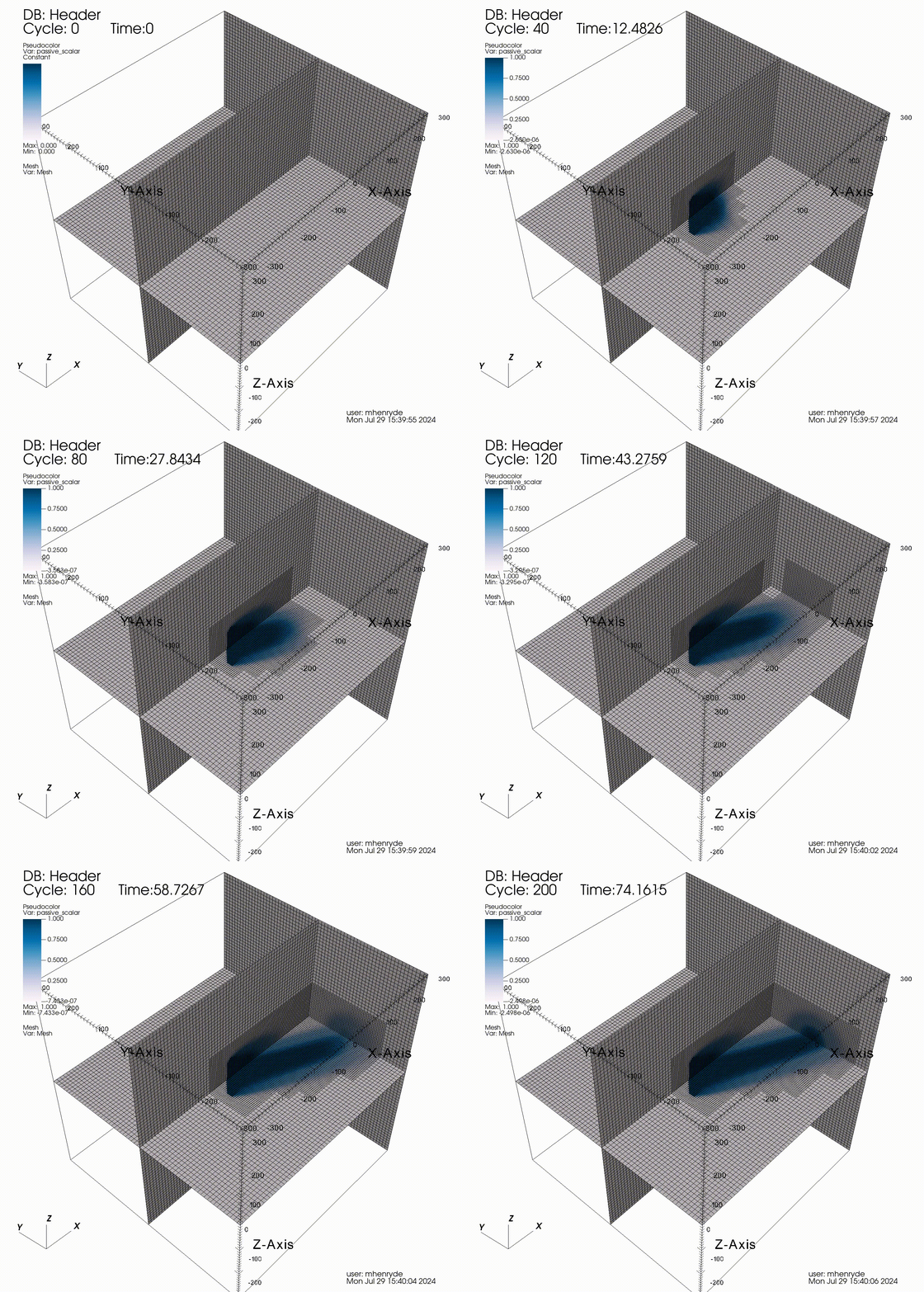
ActuatorSourceTagging
It is possible to seed a passive scalar in the flow field at locations
where the actuator source term value is above a certain
threshold. This is useful for wake visualization and for dynamic
adaptation of the mesh to the wake location. This is activated by
adding ActuatorSourceTagging to incflo.physics. It has the
following input options:
- ActuatorSourceTagging.actuator_source_threshold
type: Real, optional, default=0.1
Threshold value for the actuator source term above which the passive scalar will be set to 1.0.
Additional input parameters are
transport.passive_scalar_laminar_schmidt and
transport.passive_scalar_turbulent_schmidt to set the diffusion of
the passive scalar. This can be combined with the FieldRefinement
criteria for mesh adaptation:
tagging.labels = tracer
tagging.tracer.type = FieldRefinement
tagging.tracer.field_name = passive_scalar
tagging.tracer.field_error = 0.3 0.3 0.3 0.3
where the field_error is the value above which the cells should be
tagged for refinement. Here is an example using the
uniform_ct_disk_dynamic_adaptation regression test:
Warning
This is an experimental feature and there is no guidance yet on the values that should be used for the passive scalar and tagging criteria.